The remainder of a given division operation can be obtained using (%) operator
Lets see an example now.
My dear friends,my site is all about JAVA programming language.I think all you know about Java.It is an Open source language.My vision is to share my Java programming language all over the world.Here is the mission for that.So please feel free to share your programming with this blog.Java is on the top of best programming language in the world.It is not a difficult language to learn.So please be with me until my Java video lessons come.I need your feedback.Lets ruin the world with JAVA.
Friday, November 26, 2010
Thursday, November 25, 2010
Arithmetic Operators in JAVA
The basic operators used in calculations involving integers are given bellow.
An operand is just the term for a value which an operator is applied the priority for precedence for applies when an expression using these operators is evaluated is the same as you learned that is multiplication and divisions are executed before any addition or subtraction.
20 - 3 * 3 - 9/3
The above operations will produce the value 8 since it is equivalent to 20-9-3
You can also use parentheses in arithmetic calculations to change the sequence of operations expressions within the parentheses are always evaluated first starting with the innermost when they are nested so you use parentheses to override the default sequence of operations.Therefore the expression
(20 - 3) * (3 - 9)/3
is equivalent to 17*(-6)/3, which result in -34
Operator Description Example Result
An operand is just the term for a value which an operator is applied the priority for precedence for applies when an expression using these operators is evaluated is the same as you learned that is multiplication and divisions are executed before any addition or subtraction.
20 - 3 * 3 - 9/3
The above operations will produce the value 8 since it is equivalent to 20-9-3
You can also use parentheses in arithmetic calculations to change the sequence of operations expressions within the parentheses are always evaluated first starting with the innermost when they are nested so you use parentheses to override the default sequence of operations.Therefore the expression
(20 - 3) * (3 - 9)/3
is equivalent to 17*(-6)/3, which result in -34
Operator Description Example Result
- + Addition 5+2 7
- - Subtraction 5-2 3
- * Multiplication 5*2 10
- / Integer Division 5/2 2
- % Modulus 5%2 1
Enjoy........
Wednesday, November 24, 2010
Operators
Ok now we are going to learn some thing new.Very useful for your calculation parts in your program. You store the result of a calculation in a variable by using an assign statement. An assignment statement consist of three elements, the name of the variable where you want the result stored, the assignment operator,=, which indicates that this indeed an assignment operation, and an arithmetic expression that defines the calculation you want to perform.The whole thing is terminated by semi colon that marks the end the assign statement.
numFruit=numApples=numOranges; // calculate the total
Tuesday, November 23, 2010
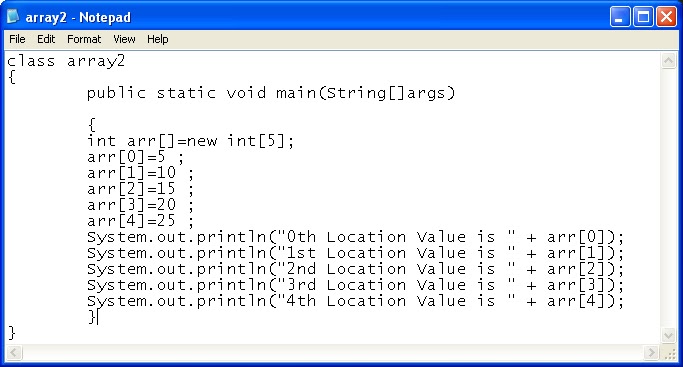
Arrays example 2
Creates a one dimensional array object of 5 locations initializes the value and prints the value..
Hope now you can crate your own array programs like this :)
Array of arrays
You have worked with only one dimensional arrays up to now, that is arrays that use a single index.
Suppose that you have a fanatical interest in the weather and you are intent on recording the tempertature at
10 separate geographical throughout the year once you have sorted out the logidtics of actually colleting this
information you can use an array of 10 elements corresponding to the number of locations where each of these elements in an array of 365 elements to store the temperature values you would declare this array with the statements.
float [] [] temperature = new float [10] [365];
hope this will be very useful for your programing knowledge
Suppose that you have a fanatical interest in the weather and you are intent on recording the tempertature at
10 separate geographical throughout the year once you have sorted out the logidtics of actually colleting this
information you can use an array of 10 elements corresponding to the number of locations where each of these elements in an array of 365 elements to store the temperature values you would declare this array with the statements.
float [] [] temperature = new float [10] [365];
hope this will be very useful for your programing knowledge
Wednesday, November 17, 2010
Accessing array elements in Java
int[] primes=new int[10]; // Creating a new array object
You can refer to an array by using the array name followed by the element's index value closed in between sqyare brackets.You can specify an index value by ant expression that produce zero or possitive result of type int . If you use a value type of long as an index, you will get an error message from the compiler, if you calculate of an index uses long variables and the result is of type long, you will need to cast it to type int.
The maximum index value for an array is one less than the number of element in the array. JAVA checks that the index values you see are valid.if you use an index value that is less than 0, or greater than the index value for the element in the array an exception will be thrown. (Index out of bound exception)
The prime array which was taken as an example above is sometimes referred to as an one dimensional error because each of its elements is referenced using one index-running from 0 to 9 in this case......
You can refer to an array by using the array name followed by the element's index value closed in between sqyare brackets.You can specify an index value by ant expression that produce zero or possitive result of type int . If you use a value type of long as an index, you will get an error message from the compiler, if you calculate of an index uses long variables and the result is of type long, you will need to cast it to type int.
The maximum index value for an array is one less than the number of element in the array. JAVA checks that the index values you see are valid.if you use an index value that is less than 0, or greater than the index value for the element in the array an exception will be thrown. (Index out of bound exception)
The prime array which was taken as an example above is sometimes referred to as an one dimensional error because each of its elements is referenced using one index-running from 0 to 9 in this case......
Tuesday, November 16, 2010
How to determine the largest value using Java Programming
Same like last post I am going to post how to find the greatest value among few values by using simple Java program. Here we have taken three integer values as a= 300, b= 25, and c=5000. I will create a class name call largenumber and I will use 'if' and 'else'
First we have to check x > y. if this satisfies then check whether x > z or not. Again if this satisfies then write in the system class that x is greater. Again the term elsr comes when x is not greater than z. So check again if z is greater than y or not. If this satisfies then type in the system class as z is greater otherwise y is greater. Now check whether y is greater than z or not.
if x is not greater than y as per the first condition then th condition else comes and now you have to check if y>z or not. If this satisfies then the output comes as y is greater.
First we have to check x > y. if this satisfies then check whether x > z or not. Again if this satisfies then write in the system class that x is greater. Again the term elsr comes when x is not greater than z. So check again if z is greater than y or not. If this satisfies then type in the system class as z is greater otherwise y is greater. Now check whether y is greater than z or not.
if x is not greater than y as per the first condition then th condition else comes and now you have to check if y>z or not. If this satisfies then the output comes as y is greater.
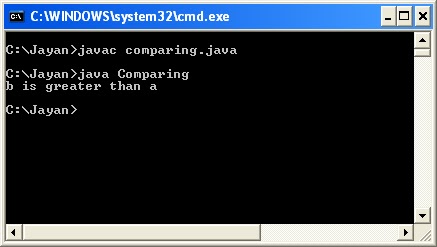
How to comparing two values in Java
ok after few days I am going to explain how to compare two numeric values using Java. We are simple going to find which number is the greater one. To start the program I will create a class file call Comparing. I will take two numbers as a= 20 and b= 25. To get the answer we have to find whether a=b, a>b or a<b. To solve this problem I am going to use ELSE condition on by one. So I will apply it as if ( a=b) else if (a>b) else println b is greater than a. :) If one of this conditions get execute you will get the print message as I given bellow in the code. So please see my notepad and command prompt screens that I upload with this post. I hope you can save your file and execute your files by giving proper command....
Monday, November 1, 2010
Statements
Dear friends what is the meaning of statements ? ok lets see.
The code for each method in the class appears between braces, and it consist of program statements.
A semicolon (;) terminates each statement. A statement in Java can spread over several lines if necessary,
since the end of each statement is determined by the semicolon, not by the end of line. Here is a java program statement
Bookonloan = true; OR Bookonloan =true;
You can generally include space and tabs and spread your statements over multiple lines to enhance readability
if it is particularly long statement but sensible constraints apply. You can't put a space in the middle of a name for instance. For example if you type book on loan the compiler will read this as three words..
The code for each method in the class appears between braces, and it consist of program statements.
A semicolon (;) terminates each statement. A statement in Java can spread over several lines if necessary,
since the end of each statement is determined by the semicolon, not by the end of line. Here is a java program statement
Bookonloan = true; OR Bookonloan =true;
You can generally include space and tabs and spread your statements over multiple lines to enhance readability
if it is particularly long statement but sensible constraints apply. You can't put a space in the middle of a name for instance. For example if you type book on loan the compiler will read this as three words..
Structure of a Java Program
Java programs always consist of one or more classes. Where you typically put the program code for each class in a separate file, and you must give each file the same name as that of the class that is defined within.
A java file must have the extension (.java) thus your file containing the class student will be called student.java
and a file contain a class called employee will have the file name as employee.java
A java file must have the extension (.java) thus your file containing the class student will be called student.java
and a file contain a class called employee will have the file name as employee.java
Subscribe to:
Posts (Atom)